


How to Protect Your Graphical User Interface (GUI) with Design Patents : A Guide for SaaS Founders and Tech Innovators
How to Protect Your Graphical User Interface (GUI) with Design Patents in 2026
In today’s competitive SaaS and tech landscape, your user interface isn’t just a functional element—it’s a core part of your brand identity. A distinctive GUI can drive user engagement, foster loyalty, and set your product apart from copycat competitors. Yet many founders overlook one of the most powerful tools available for safeguarding that visual innovation: design patents.
At Wilson Whitaker Rynell (Wilson Legal Group P.C.), our intellectual property attorneys have helped numerous Dallas, Austin, Houston, and nationwide tech companies secure robust protection for their digital designs. This in-depth guide explores how design patents can shield your GUI’s ornamental features, the latest 2026 USPTO updates that make filing easier than ever, practical filing strategies, and why proactive protection matters more now than in previous years.
Whether you’re building the next breakout productivity app, fintech platform, or consumer software tool, understanding GUI design patent protection can mean the difference between market leadership and costly imitation.
What Exactly Is a Design Patent—and Why Does It Matter for GUIs?
Design patents, granted under 35 U.S.C. § 171, protect the new, original, and ornamental appearance of an article of manufacture. Unlike utility patents that cover how something works, design patents focus purely on how it looks.
For graphical user interfaces, this means protection for the unique visual elements users interact with daily: icon arrangements, screen layouts, color schemes, button styles, animations, and overall aesthetic flow. These ornamental features become integral to your brand—think of how instantly recognizable certain app interfaces feel.
The USPTO has long recognized GUIs as eligible subject matter when properly tied to an article of manufacture, such as a computer, display screen, or computer system. Recent developments have only strengthened this pathway, giving innovators greater flexibility in claiming and illustrating their digital designs.
The Critical Role of GUI Protection in a Crowded Digital Market
SaaS companies invest heavily in UX/UI research, testing, and iteration. A polished interface reduces churn, improves conversion rates, and creates emotional connections with users. When competitors replicate your look and feel, they erode your hard-won differentiation and potentially confuse customers.
Design patents provide a relatively fast, cost-effective layer of intellectual property protection specifically tailored to visual innovation. They deter infringement, strengthen licensing negotiations, and bolster enforcement actions in federal court. In an era where apps are downloaded millions of times and interfaces define user experience, securing design rights helps preserve the economic value you’ve built into every pixel.
Updated 2026 USPTO Guidance: Greater Flexibility for GUI and Icon Design Patents
One of the most significant developments for digital innovators arrived on March 13, 2026, when the USPTO issued Supplemental Guidance for Examination of Design Patent Applications Related to Computer-Generated Interfaces and Icons. This guidance dramatically simplifies the process for GUI and icon applications by:
- Removing the previous requirement to depict a display panel (even in broken lines) in the drawings, provided the title and claim clearly identify the article of manufacture (e.g., “Graphical user interface for a computer” or “Icon for a display screen”).
- Confirming that claim language using “for” adequately satisfies the statutory article-of-manufacture requirement.
- Explicitly extending eligibility to emerging formats including projected interfaces, holographic designs, virtual reality (VR), and augmented reality (AR) interfaces—so long as they are tied to a computer or computer system and are not merely transient or disembodied images.
These changes reflect the USPTO’s recognition of how modern interfaces have evolved beyond traditional screens. Applicants now enjoy more freedom in how they present their designs while still meeting the core requirements of 35 U.S.C. § 171.The guidance applies immediately to all pending and future applications, offering current and prospective filers a more streamlined path forward.
Core Legal Requirements for a Patentable GUI Design
To qualify for design patent protection, your GUI must satisfy several fundamental criteria established by statute and USPTO practice:
- It must be new and original. The design cannot be identical to any existing GUI and must originate from the inventor rather than being copied.
- It must be novel. The overall visual impression must differ from all prior art designs in a way that a person of ordinary skill in the field would consider new.
- It must be non-obvious. Even if novel, the design cannot be an obvious modification or combination of existing interface elements to someone familiar with GUI design trends.
- It must be ornamental rather than functional. Protection covers appearance, not the underlying functionality. If a particular visual element is dictated solely by the need to perform a specific operation, it may fail the ornamentality test. However, designs that include both functional and ornamental aspects can still qualify for the ornamental portions.
- Finally, it must qualify as a design for an article of manufacture. Under the 2026 guidance, simply identifying the article properly in the title and claim (such as a computer system) is now sufficient without forcing the drawing to show a physical display boundary.
Meeting these standards requires careful drafting, high-quality drawings, and strategic claim language—areas where experienced IP counsel provide tremendous value. It's important to also review the USPTO Design Patent Application Guide from time to time, as the Patent Office issues updates.
Step-by-Step Process for Filing a GUI Design Patent Application
Filing a design patent for a Graphical User Interface (GUI) protects the unique visual appearance of your app, website, or software interface. A well-prepared USPTO design patent application can safeguard your innovative screen layouts, icons, animations, and transitional elements from copycats. Below is a clear, actionable guide to help you navigate the process successfully.
- Conduct a Thorough Prior Art Search: Start by searching existing patents, published applications, and public interfaces on the USPTO database, Google Patents, and other sources. This confirms your GUI design is novel and non-obvious, helps refine your visuals, and strengthens your application against future challenges.
- Create High-Quality Professional Drawings or Photographs: Prepare detailed illustrations or photos that fully disclose every aspect of your GUI. For static interfaces, include multiple views (front, perspective, etc.). For animated or transitional GUIs, submit sequential views showing the progression, supported by clear written descriptions. USPTO standards for line weight, shading, and broken lines (to show non-claimed environment) are strict—professional drafting is highly recommended.
- Draft a Concise Patent Specification: Include a descriptive title (e.g., “Graphical User Interface for [Your App Name]”), a brief description of each figure, and any optional feature explanations. Design patents feature a single claim that simply refers to the drawings as the embodiment of the invention.
- File the Application Electronically with the USPTO: Submit everything through the USPTO’s Electronic Filing System (EFS-Web or Patent Center). Include required forms, the inventor’s oath or declaration, and applicable fees. Qualifying for small entity or micro entity status can significantly reduce costs.
- Respond to USPTO Examination and Office Actions: The examiner reviews your application for statutory compliance and prior art. If objections arise, respond promptly with arguments, amended drawings, or clarifications. Timely responses are critical to avoid abandonment.
- Pay the Issue Fee and Receive Your Patent: Once approved, pay the issue fee to receive your official GUI design patent. This grants you exclusive rights to the visual design for up to 15 years from the grant date.
Frequently Asked Design Patent Questions
Can Design Patents Protect Dynamic Elements Like Animations?
Absolutely. The USPTO permits design patents to cover animated GUIs and transitional sequences when properly disclosed. Applicants typically include multiple figures showing key frames of the animation or transition, along with a statement in the specification describing the sequence.
This capability has proven valuable for companies protecting signature interactions—such as smooth page flips, icon morphing effects, or gesture-based screen changes. The key is ensuring the drawings and descriptions clearly convey the ornamental appearance throughout the motion without claiming functional aspects.
Real-World Examples of Protected GUI Designs
Major technology companies have successfully obtained design patents for their interface innovations. Meta Platforms (formerly Facebook) secured protection for specific display panel GUI elements through patents like USD819058S1, illustrating how even subtle visual arrangements can receive protection.
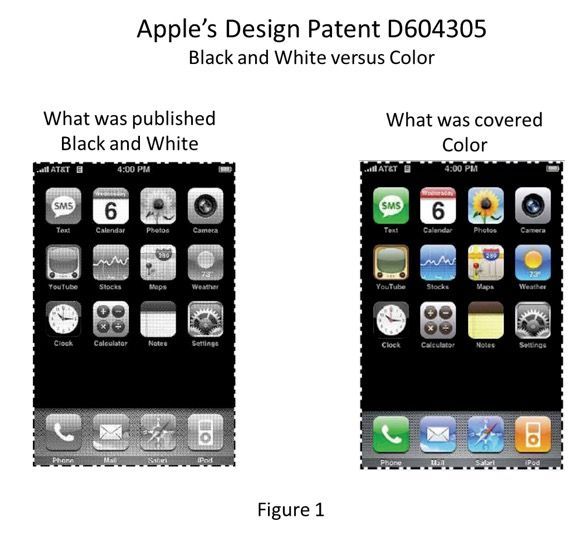
Other prominent examples include Apple’s iconic interface features and Google Nest’s animated thermostat controls. These cases demonstrate that design patents can cover everything from entire screen layouts to individual icons and transitional states.
How long does a design patent last?
Design patents generally provide 15 years of protection from the grant date, with no maintenance fees required.
Can I file a design patent after publicly launching my app?
The United States offers a one-year grace period for the inventor’s own disclosures, but international rights may be lost immediately upon public use or sale. File as early as possible.
Do I need a prototype or working software to apply?
No. Design patents protect the ornamental appearance shown in the drawings. Actual software implementation is not required for filing.
How do design patents interact with the new 2026 USPTO rules?
The March 2026 supplemental guidance applies to all applications, offering immediate benefits for pending and new GUI filings by relaxing drawing requirements and expanding eligible formats.
Ready to Safeguard Your Digital Innovation?
Your GUI represents countless hours of creative development and user-centered design. Don’t leave it vulnerable to imitation. At Wilson Whitaker Rynell, our Texas-based intellectual property team combines deep technical understanding with decades of patent prosecution and litigation experience to secure comprehensive protection for SaaS companies, software developers, and tech entrepreneurs across Texas and beyond.
Patent Solutions For You | Wilson Legal Group
Looking for Top Patent Representation in the Dallas, Houston or Austin? Contact Wilson Legal Group!
At Wilson Legal Group, we are dedicated to providing exceptional
patent licensing,
patent prosecution, and
patent protection/litigation.
Need help with patent litigation, resolving patent disputes, or securing a patent?
Our experienced attorneys are here to deliver results!
Contact Us or Call 972-248-8080 for a Free Consultation!
Serving Texas, Dallas, Houston Austin, DFW Metroplex, Collin, Denton, and Tarrant Counties









Have an idea for a blog? Click and request a blog and we will let you know when we post it!